I did not set out to decide whether olmOCR looks like an impressive OCR model. The practical question is narrower: can it become a responsible first stage for turning your PDFs into LLM-usable text?
First, the scope. This is not a local hands-on result. The checked environment can see an RTX 4070 Ti SUPER with 16,376 MiB, but it has no olmocr CLI, runs Python 3.13 rather than the README example’s Python 3.11, and has no working Docker Linux engine. No local inference, throughput, peak VRAM, page-rate, or accuracy result was completed. This is a source-grounded fit guide plus a reproducible public-PDF canary.
1. What this article can and cannot establish
I will keep four evidence labels visible: official/project-stated for the README, model card, repository samples, and tool instructions; author-reported benchmark for olmOCR-Bench and paper results; reader-run reproducible test for the 3–5 PDF protocol below; and unknown/not tested for language coverage, private-data behavior, current pricing, and local results.
The bounded conclusion is useful: olmOCR is a promising open-source starting point for batch PDF linearization and later LLM data preparation. A Markdown file appearing on disk does not mean a clean training dataset is finished. Tables, equations, key numbers, provenance, privacy, deduplication, schema, and licensing still require separate acceptance checks.
2. What olmOCR actually does
The project README lists PDF, PNG, and JPEG inputs. Its --markdown path writes clean Markdown, while the workspace also contains Dolma and Markdown outputs. That describes the tool path; it does not guarantee extraction quality for every document.
The project positions the pipeline around natural reading order, figures, multi-column layouts and insets, headers and footers, equations, tables, handwriting, and complex layouts. Treat those as project-stated targets, not as a guarantee that every such page will be correct.
The model card describes single-page document images, a 1288-pixel longest edge, and additional document metadata. The full toolkit also handles rendering and prompt metadata. Loading the model directly is not the same thing as running the complete PDF toolkit successfully.
That distinction matters: “it produced Markdown” and “it produced usable dataset material” are different claims. The second requires page-level comparison, critical-field checks, and provenance records.
3. How to read an 82.x benchmark
The current README describes olmOCR-Bench as having 7,000+ test cases across 1,400 documents, with ArXiv, old-scans math, tables, old scans, headers/footers, multi-column, long tiny text, and base subsets. The model-card v0.4.0 table reports BF16/FP8 overall scores of 82.3/82.4 ± 1.1; FP8 subset scores include 47.7 for old scans, 84.9 for tables, 96.1 for headers/footers, 83.7 for multi-column, and 99.7 for base.
These are author-reported benchmark values tied to the stated English suite and pipeline. 82.4 is not your field accuracy, not your production success rate, and not “82 out of every 100 PDFs are ready.” The category spread is the important warning: document class changes the risk, so an average cannot replace your acceptance rules.
The v1 paper also describes a 7B VLM trained on 260,000 pages from more than 100,000 crawled PDFs and reports roughly $190 per million pages in its study. That is an attributed paper result, not current cloud pricing, local cost, throughput, or an end-to-end estimate.
The olmOCR 2 report describes Qwen2.5-VL-7B-Instruct as a starting point and GRPO/RLVR with binary unit tests; the page reward is the share of tests passed. That explains an evaluation mechanism, not arbitrary-document quality.
4. Runtime choices and data boundaries
The README installation example uses Python 3.11, a CUDA 12.8 PyTorch index, and guidance of at least 12GB of GPU RAM plus about 30GB of disk. Recent NVIDIA GPUs listed as tested examples include the RTX 4090, L40S, A100, and H100. The minimum memory guidance is an installation boundary, not a speed or quality guarantee.
The deployment paths are not interchangeable buttons: local GPU, OpenAI-compatible remote inference, Docker, S3 shared workspace or multi-node, and Beaker each move different responsibilities. Docker is packaging; --gpus all does not turn a GPU requirement into a CPU path. S3 and cluster routes add permission, network, residency, and consistency concerns.
For private files, define what may leave the machine before choosing a path. Local serving still requires checks around caches, logs, and application permissions. A remote endpoint requires provider terms, retention, residency, and organizational policy. The Gemma 4 local AI workflow guide is a useful comparison for local processing, private files, and hardware boundaries. For hosted, API, and self-hosted responsibility, see Kimi K3: hosted access, API, and self-hosting boundaries.
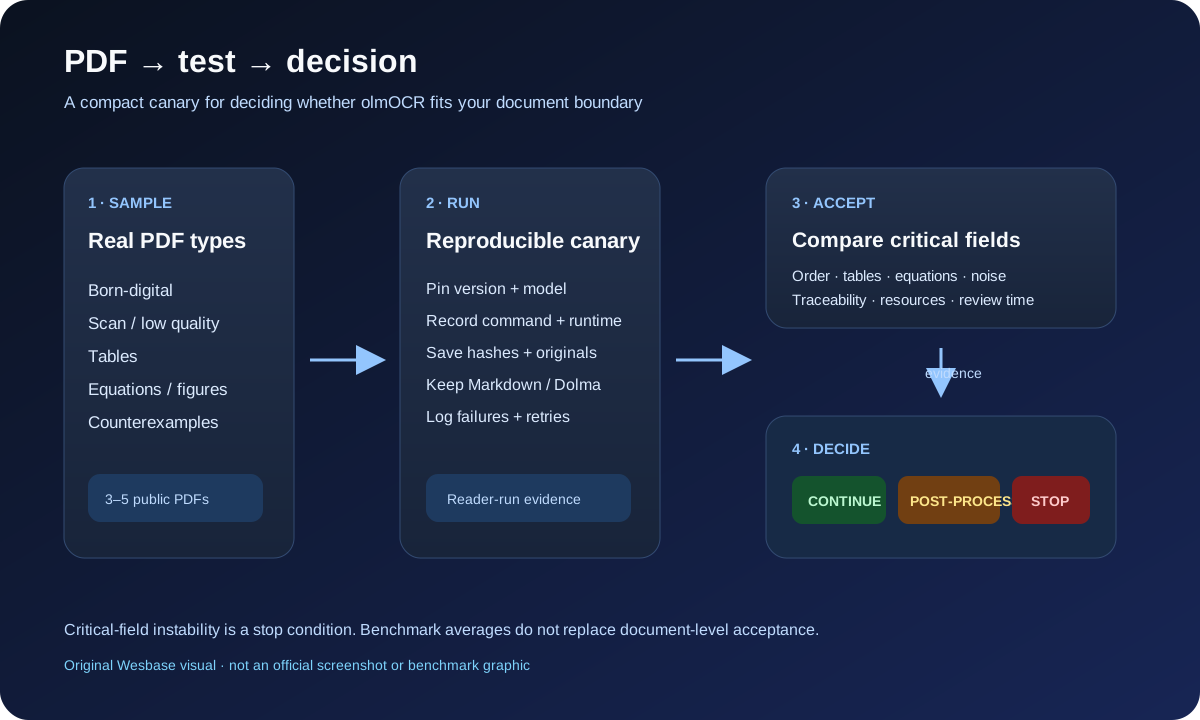
5. Run a 3–5 PDF canary
This is a reader-run reproducible test, not a result completed by this article. Freeze the sample set, versions, and acceptance rules before running. Do not select only easy successes.
| Sample layer | Include at least | Observe |
|---|---|---|
| Born-digital | A multi-column document with a normal text layer | reading order, column interleaving, headers/footers, paragraph boundaries |
| Scan | A scan or low-quality page | missing and wrong text, rotation, noise, failed pages |
| Table | A table containing critical numbers | row/column relationships, units, totals, cross-page structure |
| Equation/figure | Equations or mixed figure-and-text layout | variables, delimiters, captions, text-to-figure relationships |
| Counterexample (optional) | Handwriting, forms, tiny text, or mixed language | which classes remain unverified |
For every input, save the PDF URL and license, SHA-256, page count, and file size. Record the olmOCR commit or tag, model and HF revision, Python/torch/vLLM/CUDA versions, GPU or endpoint, command, concurrency, pages_per_group, workspace, timestamps, logs, and raw Markdown/Dolma.
Do not decide what “pass” means after the run. Mark critical fields in advance: numbers, dates, units, variables, table values, and page references that must survive. Compare every page with the source and label missing, wrong, invented, reordered, and unreadable content. Record failures and retries.
6. Output acceptance checklist
| Check | Passing question | If it fails |
|---|---|---|
| Completeness | Are every page and critical passage present? | Preserve the failure sample; do not assume post-processing can repair it |
| Reading order | Are columns, footnotes, headers, and footers interpretable? | Retrieval and summarization may join unrelated context |
| Structure | Are table rows, equation delimiters, and captions still usable? | Add rules or human review before scaling |
| Errors | Are critical numbers, dates, and units preserved? | Stop expansion while critical fields are unstable |
| Traceability | Can the output return to the page, original, and version? | It is not auditable or safely reusable |
| Resources | Are runtime, failures, retries, and review time acceptable? | Recompare local, remote, or another pipeline |
“Usable for an LLM” does not mean visually clean. It means the information relationships remain reliable and a future reviewer can identify the source page and PDF version.
If the text enters a long-lived knowledge base, keep the original, hash, Markdown, acceptance decision, and human edits together. For the connection between extracted text, provenance, human verification, and reusable decisions, see Preserve decisions, not answers: a knowledge system for the AI era.
7. Decision matrix and stop conditions
| Test result | Decision | Next move |
|---|---|---|
| Critical fields pass; structure, resources, and data boundary are acceptable | Continue | Expand the sample while preserving versions, logs, and acceptance records |
| Body text and order work, but tables, equations, noise, or provenance need rules | Post-process / human review | Define rules, sampling, and failure feedback before calling it automated cleaning |
| Critical relationships remain unstable, or the required data path is unacceptable | Stop / retain another pipeline | Keep the counterexamples and use a traditional parser, specialized OCR, or manual flow |
Freeze project thresholds before the test. Do not turn a benchmark average into your key-field rule. Chinese/CJK, vertical text, business-critical fields, private PDFs, native Windows/Python 3.13, provider pricing/retention, and complete legal or training-license suitability are not established by the material here. They are unknown/not tested, not automatic passes.
8. What the test cannot prove
This method cannot prove universal PDF quality, reliable Chinese or mixed-language support, stable operation on a 16GB GPU, local throughput, peak VRAM, page rate, local quality, current remote pricing or retention, private-data safety, or that the output meets training-license and legal requirements.
It can establish something more useful: whether, for fixed document classes, versions, commands, and acceptance rules, you have enough evidence to scale. Recheck and rerun the public-PDF canary when the repository changes its tool or model version, default model, hardware instructions, license/data/model artifacts, language or Demo/service path, or materially changes benchmark or sample claims.
FAQ
Is olmOCR a general OCR?
It is an open-source pipeline aimed at PDF linearization and complex layouts, with documented targets and public failure examples. Calling it a universal OCR that guarantees every PDF goes beyond the evidence.
Does 82.4 equal my data accuracy?
No. It is an author-reported result tied to an English suite and version. Your acceptance object is critical fields, reading order, table relationships, and failure samples.
Does a 16GB NVIDIA GPU prove local readiness?
No. Memory is only one boundary. Python, CUDA, model, driver, resources, and actual quality must be checked in your environment. This article has no local inference result.
Is a remote OpenAI-compatible service suitable for sensitive PDFs?
Only if your organization permits the data path, retention and residency are acceptable, and the provider terms fit. An API shape does not remove data responsibility.
Can Markdown go directly into training?
Do not assume it. Check missing content, order, tables, equations, provenance, privacy, deduplication, schema, and licensing first.
What about Chinese or mixed-language PDFs?
Put them in a separate canary with real samples and critical-field checks. The official material used here is not enough to promise Chinese or CJK support.
Conclusion
olmOCR is worth testing as an open-source starting point when the task is batch PDF linearization and you can provide a suitable NVIDIA GPU or a controlled compatible inference service. It is not a black box that produces a clean dataset after one command.
Choose 3–5 clearly licensed, non-sensitive PDFs covering real layouts. Pin the version and command. Preserve originals, hashes, Markdown, logs, and itemized acceptance results. Scale to your own corpus only after critical fields, resource limits, and the data path pass.
Sources and visual note
Facts come from the olmOCR README, olmOCR 2 model card, v1 paper, olmOCR 2 report, and official gnarly PDF samples. Benchmark and cost figures remain attributed results, not local measurements. The flow diagram is an original Wesbase SVG, not an official screenshot or copied benchmark graphic.