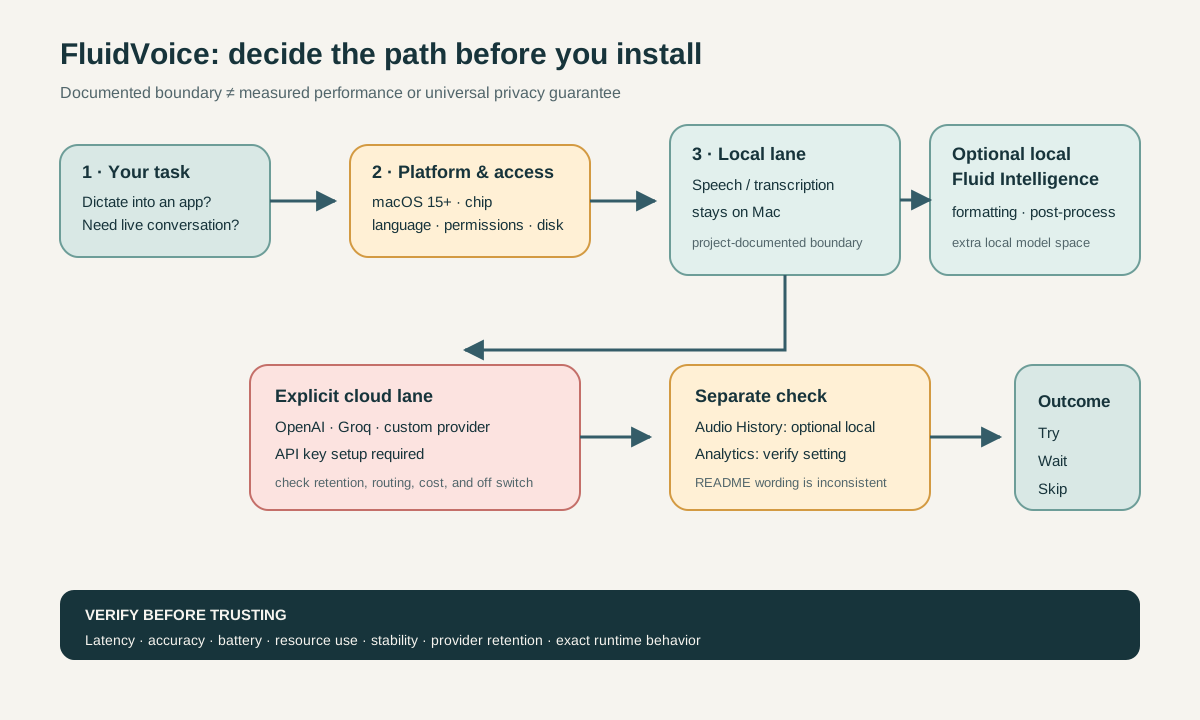
Check these six things before installing
- Are you on macOS 15 or later? The current documentation and Homebrew cask list macOS 15+ as the requirement. If not, wait for a requirements change or choose another path.
- Is your Mac Apple Silicon or Intel? Apple Speech and Whisper have Intel paths; the documented Nemotron, Parakeet, Cohere, and Fluid Intelligence paths require Apple Silicon.
- Does the selected model support your target language? Choose the language first. Do not infer support for every model from the broadest language list.
- Are you comfortable granting Microphone and Accessibility access? Microphone access is needed for dictation; Accessibility access supports Smart Typing into apps.
- Can you reserve the storage? Each voice model is approximately 1 GB, and optional Fluid Intelligence is approximately 3.5 GB. These are approximate figures.
- Do you need cloud enhancement? If yes, you must select a provider, add an API key, and treat local dictation and cloud enhancement as separate data paths.
If one of the first four checks fails, wait or skip. If the cloud boundary is the only problem, assess the local path on its own. If you actually need live conversation rather than speech input into a text field, compare it with real-time voice interaction.
Compatibility and risk matrix
| Decision dimension | What the official material documents | What it means for you | What remains unknown |
|---|---|---|---|
| Operating system | macOS is the current platform; macOS 15+ is required; v1.6.5 was published on July 21, 2026 at 03:02 UTC | A Mac below macOS 15 does not meet the current documented requirement | Whether a later release changes the requirement |
| Architecture | Apple Speech and Whisper are listed for Apple Silicon + Intel; Nemotron, Parakeet, Cohere, and Fluid Intelligence require Apple Silicon | Intel users have a narrower model choice and should start with the documented Whisper or Apple Speech paths | Actual speed, resource use, and stability for each path |
| Language and model | TDT v3 lists 25 languages; TDT v2 and Parakeet Flash list English; Cohere lists 14 including Mandarin; Whisper lists up to 99 depending on model; Apple Speech depends on system-language support | Pick a model for a language, rather than treating multilingual support as universal | Real-world results for a particular version, language, and input environment |
| Permissions | Microphone and Accessibility access are documented requirements for dictation and typing | Users unwilling to grant either permission are a poor fit for this workflow | Permission prompts, denial behavior, and app-specific differences |
| Storage | About 1 GB per voice model; about 3.5 GB for optional Fluid Intelligence | Model storage belongs in the installation budget | Exact downloads, caches, upgrades, and removal behavior |
| Data path | The documentation says voice, audio, and transcribed text stay on the Mac unless the user explicitly selects a cloud AI provider | This is a conditional local-first boundary, not a universal privacy guarantee | Provider retention, routing region, and request behavior |
| Analytics | The privacy section says anonymous analytics are enabled by default and can be disabled, while another passage calls them opt-in | Check the setting after installation rather than relying on one sentence | The current runtime default and whether the documentation will be reconciled |
| License | The project says GPLv3 applies from February 23, 2026 | Read the license before distributing, modifying, or integrating | Whether your specific use complies; this requires legal advice when material |
Local speech, optional local enhancement, and cloud are different paths
1. Local speech and transcription
The project documentation says that voice, audio, and transcribed text stay on the Mac unless the user explicitly chooses a cloud AI provider. That supports a local-first decision. It does not support the absolute claim that no data can ever leave the Mac.
The listed models include Nemotron Speech 3.5, Nemotron 3.5 Multilingual, Parakeet Flash (Beta), Parakeet TDT v3/v2, Cohere Transcribe, Apple Speech, and Whisper Tiny/Base/Small/Medium/Large. A long model list is not a quality ranking, and it does not mean every model fits every chip or language.
2. Optional local Fluid Intelligence
Fluid Intelligence is described as a local runtime for smart formatting, context-aware capitalization, and post-processing, with an approximate 3.5 GB model download. It is an optional path, separate from basic speech transcription; the documentation also says it is privately maintained by another party.
So split the question in two: does basic dictation fit your device, language, and permissions; and do you need an additional local post-processing layer? The second choice adds storage and a separate maintenance boundary. This article has not measured its speed, quality, or resource use.
3. Explicit cloud providers
The official material lists OpenAI, Groq, and custom providers. These paths require the user to add an API key; the README says keys are stored in the macOS Keychain and that the user selects “Always allow” for key access. Cloud enhancement is therefore an explicitly configured boundary, not an invisible extension of local processing.
For a broader way to separate local, hosted, API, and deployment boundaries, see the Kimi K3 access and deployment guide. The useful question is not just whether an API is supported. Ask what is sent, how the provider retains it, where requests are routed, how costs work, and how the path can be disabled.
4. Audio History and analytics
Audio History is described as optional local recording history with budget controls and ZIP export; that feature description does not describe cloud storage. “The project describes it this way” is still different from verifying the behavior after enabling it, so start with low-risk audio.
The analytics wording has a direct inconsistency. One privacy section says anonymous analytics are enabled by default and can be disabled in Settings; another passage calls analytics opt-in. The project lists high-level app, configuration, usage, and success/error data, and says it excludes voice, raw audio, transcripts, selected text, prompts, responses, terminal commands, window titles, file paths, clipboard, typed content, and personal or private information. Because the default-state wording conflicts, check the current setting yourself.
Who should try it—and who should wait?
A good fit
- You use macOS 15+ and are willing to confirm your chip, model, and language combination.
- You need microphone input and Smart Typing and accept Microphone and Accessibility permissions.
- You want to assess a local speech path while keeping optional local and cloud enhancement as separate decisions.
- You can start with low-risk text and accept that performance and accuracy require your own verification.
A poor fit for now
- Your Mac is below macOS 15, or your architecture-language-model combination is not documented.
- You do not want to grant Microphone or Accessibility access.
- You cannot reserve space for one or more local models.
- You need a prior answer to “fastest,” “most accurate,” or “most private,” and would treat project documentation as independent testing.
- You cannot accept an optional cloud provider, API-key setup, or an analytics setting that needs explicit rechecking.
If voice AI is part of a phone purchase rather than Mac dictation, use the AI phone device, permission, region, and privacy checklist. The same “voice AI” label does not imply the same execution path across devices.
Before you install
- Confirm macOS 15 or later.
- Confirm Apple Silicon or Intel and choose a documented model path.
- Confirm the target language and exact model.
- Accept the Microphone and Accessibility permissions required by the workflow.
- Reserve approximately 1 GB per voice model and, if needed, approximately 3.5 GB for Fluid Intelligence.
- Choose
brew install --cask fluidvoiceor the latest GitHub release as your install path. - Read the current license notice; this article is not legal advice.
- Decide whether you need Fluid Intelligence or a cloud provider; do not enable everything by default.
- If using OpenAI, Groq, or a custom provider, understand the API-key storage and access boundary.
- Check the anonymous-analytics setting after installation, especially because the README uses conflicting default-state language.
- Use low-risk, reproducible text to verify Audio History, permission prompts, and model-download behavior.
FAQ
Can FluidVoice run on an Intel Mac?
There are documented Intel paths: Apple Speech and Whisper are listed for Apple Silicon and Intel, and Intel support through Whisper is noted from 1.5.1 onward. Nemotron, Parakeet, Cohere, and Fluid Intelligence require Apple Silicon according to the documentation. Do not turn “Whisper works on Intel” into “every model works on Intel.”
Does FluidVoice support Mandarin?
Cohere Transcribe is listed with 14 languages, including Mandarin. Whisper is listed with up to 99 languages depending on model size. TDT v3, TDT v2, Parakeet Flash, and Apple Speech have different scopes, so verify the exact model and current release before installing.
Does local-first mean no data leaves the Mac?
That is not a safe summary. The project documents voice, audio, and transcription as staying on the Mac, while cloud providers are optional configuration. The analytics default is described inconsistently. Keep the documented local path, the explicitly configured cloud path, and the actual settings state separate.
Is it faster or more accurate than cloud dictation?
No ranking is supported here. There was no eligible hands-on Mac test and no reproducible cloud comparison. Speed, accuracy, CPU/GPU/RAM use, battery impact, stability, model downloads, and update success remain unknown.
When should I recheck the decision?
Recheck after a new release, a model or language-list change, a permission-flow change, a provider change, or a privacy-documentation revision. The current official release snapshot is v1.6.5, but release existence is not evidence of quality; it is simply a trigger to revisit the boundary checks.
The final call
If you are on macOS 15+, have confirmed your architecture and language, accept the required permissions, and have room for the models, FluidVoice can enter a low-risk trial list. Validate your own input workflow first, then decide whether to add Fluid Intelligence or cloud enhancement.
If the blocker is the OS, chip, language, permissions, or storage, wait or choose another path. If you require a fully audited privacy boundary, fixed performance, or an independent benchmark, the official material used here is not enough to recommend adoption. Choosing not to install yet is not a verdict against the project; it is a recognition that compatibility and data-path questions are answerable while real-world experience and several operational boundaries still need verification.
The update triggers are a new release; a change to the Homebrew cask version or installation metadata; a change to documented platform availability or Mac architecture requirements; a change to Fluid Intelligence availability or its licensing boundary; or a change to the official requirements, model or language list, license, cloud providers, analytics wording, or Audio History data-path description. When one changes, rerun the matrix instead of carrying forward the old conclusion.