Bottom line
Google is moving Android from “open an app and operate it” toward “describe the goal and let the phone handle the steps.” That is the direction behind Gemini Intelligence. For the platform-policy layer, see the EU Android AI interoperability decision and permission boundaries to separate Google’s own rollout from future third-party access.
It is not, however, a single mode arriving on every Android phone at once. Google says the first rollout starts with recent Samsung Galaxy and Google Pixel phones in summer 2026, with broader Android and companion-device availability later.
The practical questions are therefore simple: will your device get it, what data will it need, and do you still make the final decision?
What Google announced
On May 12, 2026, Google introduced Gemini Intelligence for Android with several capability groups:
| Capability | Google’s public description | What users should check |
|---|---|---|
| Multi-app tasks | Handle multiple steps in food-delivery and rideshare scenarios | App support and final confirmation |
| Gemini in Chrome | Research, summarize, compare, and handle selected browsing tasks | Page content, login state, and pre-submit review |
| Intelligent Autofill | Fill more relevant fields across apps and Chrome | Whether it is enabled and which profile data is connected |
| Rambler | Turn natural speech into clearer writing | Voice privacy, language support, and text review |
| Create My Widget | Generate custom widgets from natural language | Data sources, update behavior, and usefulness |
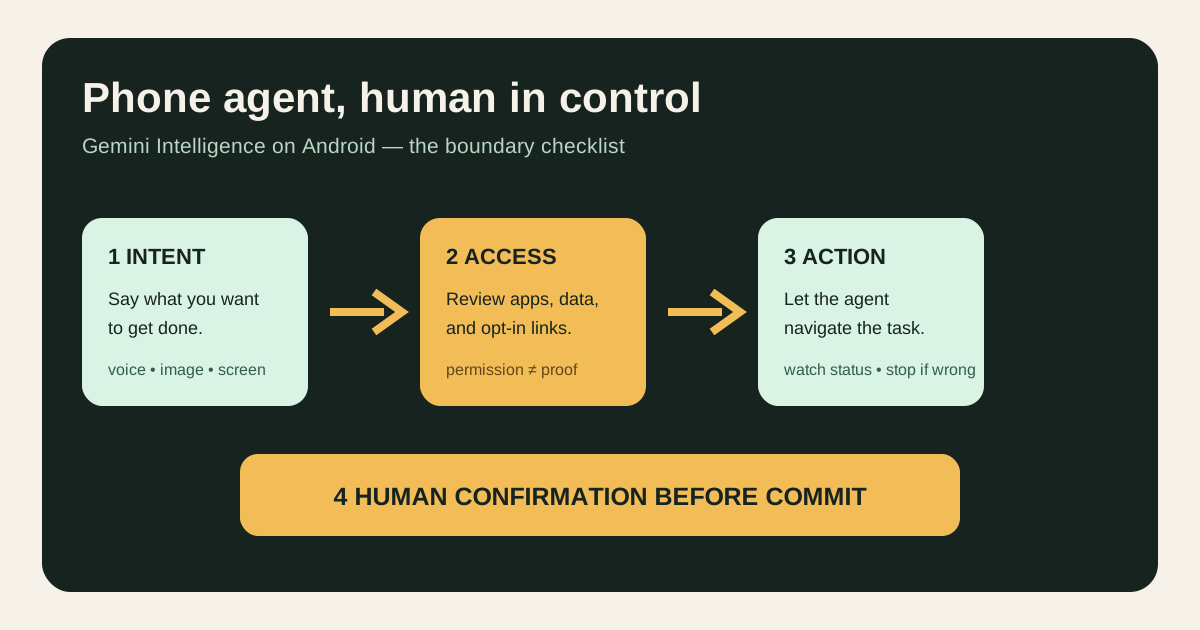
Google also describes automation that can use screen or image context and show progress through notifications. Its public wording keeps the user in control and leaves a final confirmation after the task is complete.
This is not “an AI butler on every phone”
The easiest mistake is to merge a product demo, a system feature, and actual availability into one claim.
Confirmed: Google says Gemini Intelligence starts with recent Galaxy and Pixel phones in summer 2026 and expands to more Android devices later.
Not confirmed in the cited announcement: a complete model, country, language, and app-support matrix. Even within one phone family, access may vary by region, software version, account, or partner app.
Google’s July 1 AI recap lists Android 17, the June Pixel Drop, and Gemini upgrades separately. “Android AI” is therefore a set of device- and service-dependent features, not one universal switch.
What changes from assistant to agent
An assistant usually answers a question or executes one command. A phone agent tries to understand a goal, open several apps, use context, complete intermediate steps, and return the result to you.
That creates new checkpoints.
First, permissions. Filling a form, finding an email, or shopping from a photo may require access to connected apps and context. Permission is not a one-time detail; it is a data boundary to review.
Second, reversibility. Summarizing a page or cleaning up a draft is easy to undo. Paying, booking, sending, or changing an account setting has real consequences. The closer an action is to submission, payment, or external communication, the more important human confirmation becomes.
Third, failure behavior. An agent can choose the wrong item, misread an address, lose a login state, or break when an app changes. A successful demo is not an exception-handling policy.
A three-level trial checklist
Try first: low-consequence tasks
Start with web summaries, voice drafts, or a weather and meal-planning widget. If the result is wrong, the cost is usually limited.
Review carefully: personal-data tasks
For Gmail, Photos, Chrome Autofill, shopping lists, or travel details, check which accounts and data are connected. Verify names, addresses, dates, products, and prices before proceeding.
Keep manual: irreversible actions
Keep payment, important forms, formal messages, account changes, and booking confirmation manual. The phone can prepare the action; it should not take responsibility for the final one.
Is it a reason to upgrade?
Gemini Intelligence alone is usually not enough. A safer order is:
- Check whether your exact model, region, and software version are in the first wave.
- Confirm that your everyday shopping, travel, email, and browser apps support the relevant flow.
- Review connections for Gemini, Autofill, Photos, Gmail, and Chrome.
- Compare update support, battery life, price, and repair cost—not just the number of AI features.
- Decide after real use shows time saved rather than extra verification work.
Confirmed facts, inference, and uncertainty
Confirmed: Google has published the feature direction, first-device scope, and phased rollout language. It also says Autofill connections are opt-in and Rambler audio is used for real-time transcription without being stored or saved.
Reasonable inference: Android competition will shift from “who has an AI button?” toward “who can complete more real tasks with user permission?” That is a product-shape inference, not proof that any particular app is stable today.
Still uncertain: the full device and regional list, exact rollout dates for each feature, language coverage, third-party app compatibility, and success rates in complex forms or transactions. Without device documentation or hands-on evidence, do not turn Google’s demonstrations into a universal guarantee.
FAQ
Is Gemini Intelligence available on every Android phone?
No. The first wave targets recent Galaxy and Pixel phones, with more devices later. Eligibility depends on the model, region, software, and account.
Can it buy or book things without me?
Google describes user control and final confirmation. Still check the item, price, address, time, and submission before committing.
Which permissions should I review first?
Start with Gmail, Photos, Chrome, shopping or rideshare apps, and Autofill. Grant only what the task requires.
Is voice audio saved?
Google says Rambler audio is used for real-time transcription and is not stored or saved. Check the device privacy notice for other voice features.
Is this enough reason to upgrade now?
Not by itself. Verify availability first, then weigh price, update support, privacy controls, and whether the feature solves a real task. To compare those checks across iPhone, Pixel, and Galaxy, use this 2026 AI phone buying guide.
To compare whether competing assistants may gain similar system entry points, cross-app actions and permission controls, continue with our EU Android AI interoperability checklist.
Image and source notes
The cover is an original Wesbase phone-agent boundary diagram. It uses no Google logo, product screenshot, or media artwork. Feature and rollout facts come primarily from Google’s Android and AI posts. The need for review and human takeover is a general task-automation risk judgment, not a performance test of a particular phone.