Bottom line
GPT-Live is worth trying now, but it is not a reason to hand over every voice task.
If you want language practice, spoken brainstorming, commute notes, or quick questions about public information, the new direction is meaningful. GPT-Live uses a full-duplex architecture that can keep listening while it speaks, and it can delegate search or harder reasoning to a background model.
If you need video, screen sharing, connected apps, plugins, predictable limits, or an auditable enterprise workflow, Live still has clear boundaries. A more natural conversation is not the same thing as more permission or a more reliable work agent.
What changed
OpenAI introduced GPT-Live on July 8, 2026 as a new generation of voice models powering ChatGPT Voice. The important phrase in the launch is full duplex: the system can keep processing input while generating output, then decide more frequently whether to speak, pause, wait, interrupt, or use a tool.
Older voice systems often followed a rigid sequence: listen, transcribe, think, then speak. GPT-Live is designed to reduce that turn-taking friction. You can interrupt it, pause without immediately triggering a response, or ask it to stay quiet.
The second change is separating conversational continuity from deeper work. OpenAI says GPT-Live handles the live interaction while a model such as GPT-5.5 can work in the background on search, reasoning, or more complex tasks. That is an official architecture description, not a promise that every question will have identical speed, quota, or accuracy.
Confirmed capabilities and boundaries
| Area | Public information | What it means |
|---|---|---|
| Continuous interaction | Full duplex with pauses, interruptions, and waiting | More natural for practice, notes, and questions |
| Background search and reasoning | Harder work can be delegated to another model | Voice can do more than read an answer, but results still need checking |
| Visual results | Some supported weather, sports, and similar cards | Certain answers can be heard and viewed together |
| Mixed input | Text and images can be used in the same Voice chat | Not every context has to be spoken aloud |
| Video and screen sharing | Not initially supported by Live | Keep Advanced when the screen is part of the task |
| Connected apps and plugins | Not initially supported | Live is not a universal enterprise entry point |
| Enterprise workspaces | Not initially available in Business, Enterprise, or Edu | Personal rollout does not prove enterprise availability |
OpenAI Help also says availability depends on plan, region, and app version. Paid plans use GPT-Live-1, while Free users get GPT-Live-1 mini. Voice limits can vary by plan and option.
Who should try it now
Language learners are an obvious early group. Natural turn-taking, interruptions, and requests to slow down are closer to practice with a conversation partner than simply listening to generated text. But language quality can vary, so an English demo is not evidence of identical quality in every language.
People who need to capture ideas quickly are another good fit. During a walk or commute, you can speak rough thoughts and ask for an outline, task list, or set of questions. These are relatively low-risk tasks and make good first experiments.
Users who need public-web information can also benefit. GPT-Live can search, making it useful for routes, weather, schedules, and public facts. “Can search” does not mean every answer has been verified, so open the sources for prices, policies, medical, legal, or other consequential decisions.
Finally, anyone curious about voice interaction should test it in their own phone, network, language, and noise conditions. GPT-Live’s value is not only a smarter answer; it is whether it interrupts less, handles pauses better, and keeps context when you change direction.
Try, keep, or wait
| Choice | Good fit | Check first |
|---|---|---|
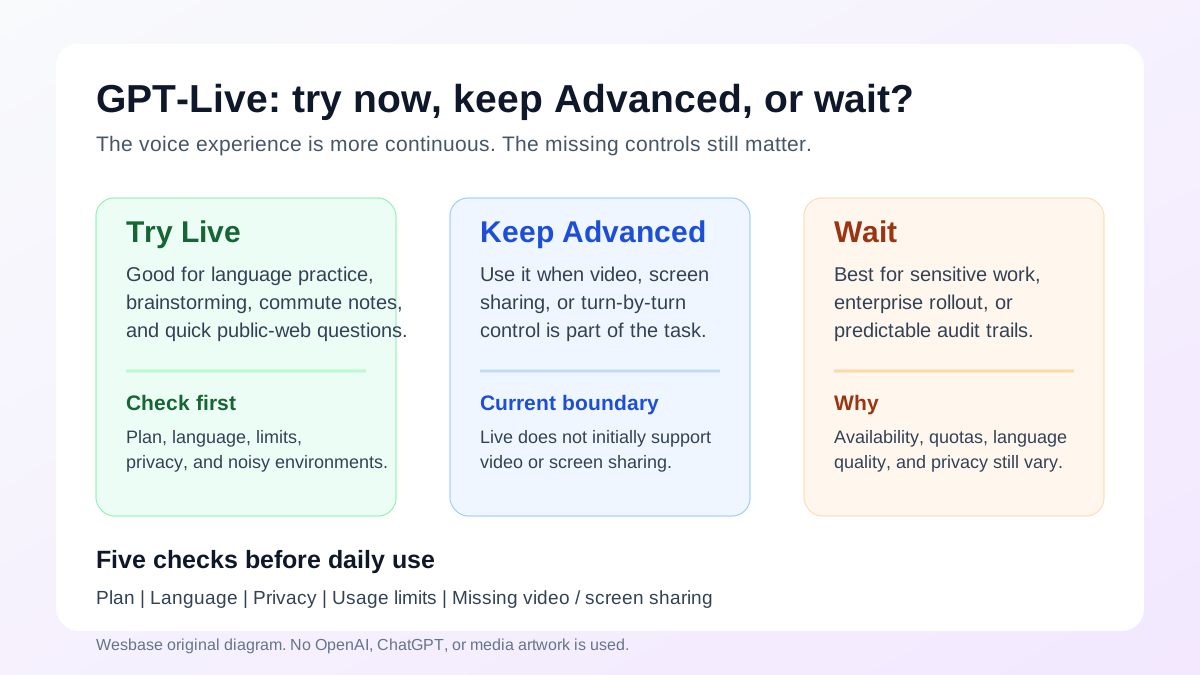
| Try Live now | Language practice, brainstorming, commute notes, public-web questions | Plan, language, limits, privacy, and noise |
| Keep Advanced | Video, screen sharing, and mobile visual assistance | Live currently lacks these capabilities |
| Use Standard | Clear turn-by-turn control and visible transcription | Trade naturalness for inspectability |
| Wait | Sensitive work, enterprise deployment, long tasks, and app-connected workflows | Permissions, quotas, auditability, and integrations |
A conservative rollout is to start with public information, then personal drafts, and only later consider more private material. Do not begin with customer records, financial files, account actions, or irreversible tasks.
Five checks before daily use
First, check your plan and region. The GPT-Live-1 or mini model, the voice entry point, and the limits you see may differ from another user’s account.
Second, check language quality. OpenAI notes that some languages may have a non-native accent or gaps in fluency. For important content, ask for a written version that can be reviewed instead of trusting the voice alone.
Third, check privacy. Voice is continuous input. Know whether you are sharing audio, images, text, or memory context. In sensitive situations, minimize what you provide and review your account settings and current help documentation.
Fourth, check what is missing. Live is not a complete replacement for Advanced: video, screen sharing, connected apps, and plugins can change the decision.
Fifth, check the answer, not only the voice. Natural pauses, acknowledgement sounds, and a human-like tone can increase trust—and make errors sound more convincing. Ask for sources, dates, and uncertainty when the facts matter.
What remains uncertain
OpenAI’s published evaluations report that GPT-Live-1 performed better than the previous Advanced Voice experience in internal preference, search, and voice-task tests. Those are not independent evaluations, and they do not prove identical performance across languages, networks, and noisy environments.
“Full duplex” describes an interaction architecture. It does not mean human-level understanding or zero interruptions. The system can still misread a pause, misunderstand speech, or return an incomplete answer while a background search is running.
Background delegation also does not make speed, cost, or quotas fixed. Plan, region, task difficulty, and rollout stage can affect the experience. Enterprise users especially should not infer that the personal rollout means Live is already supported in Business, Enterprise, or Edu.
FAQ
How is GPT-Live different from older Voice modes?
GPT-Live is designed for continuous interaction, handling pauses and interruptions more flexibly. OpenAI also says it can delegate search and complex reasoning to a background model.
Can free users use GPT-Live?
OpenAI says GPT-Live-1 mini is for Free users while paid plans use GPT-Live-1. Availability still depends on plan, region, app version, and usage limits.
Does GPT-Live support video and screen sharing?
ChatGPT Help says Live does not initially support video or screen sharing; those capabilities remain available in Advanced Voice on eligible mobile plans.
Can GPT-Live connect to enterprise apps?
Live does not initially support connected apps or plugins, and it is not available at launch in Business, Enterprise, or Edu workspaces.
Should I give sensitive work to a voice AI now?
Do not infer that from a natural conversation demo. Check plan, region, privacy settings, data handling, usage limits, and human review before sharing sensitive material.
Image and source notes
The cover is an original Wesbase voice-AI decision matrix. It uses no OpenAI or ChatGPT logo, product screenshot, or media image. The article relies on OpenAI’s GPT-Live announcement, ChatGPT Voice Help, OpenAI release notes, GPT-Live system cards, and independent TechCrunch coverage. Official facts, inferences, and areas without independent validation are explicitly separated.