The change is bigger than a stronger model
The easiest way to talk about OpenAI’s GPT-5.6 launch is to focus on scores, cost, and reasoning capability. For most teams, the more important change is that OpenAI is also pushing ChatGPT Work forward, bringing chat, Codex, connectors, browser work, desktop context, and scheduled tasks into one work-agent surface.
The question is no longer only whether the model gives a better answer. The practical question is whether you can delegate a real workflow: ask it to read source material, check the web, edit files, create a sheet or deck, and return something that can be reviewed.
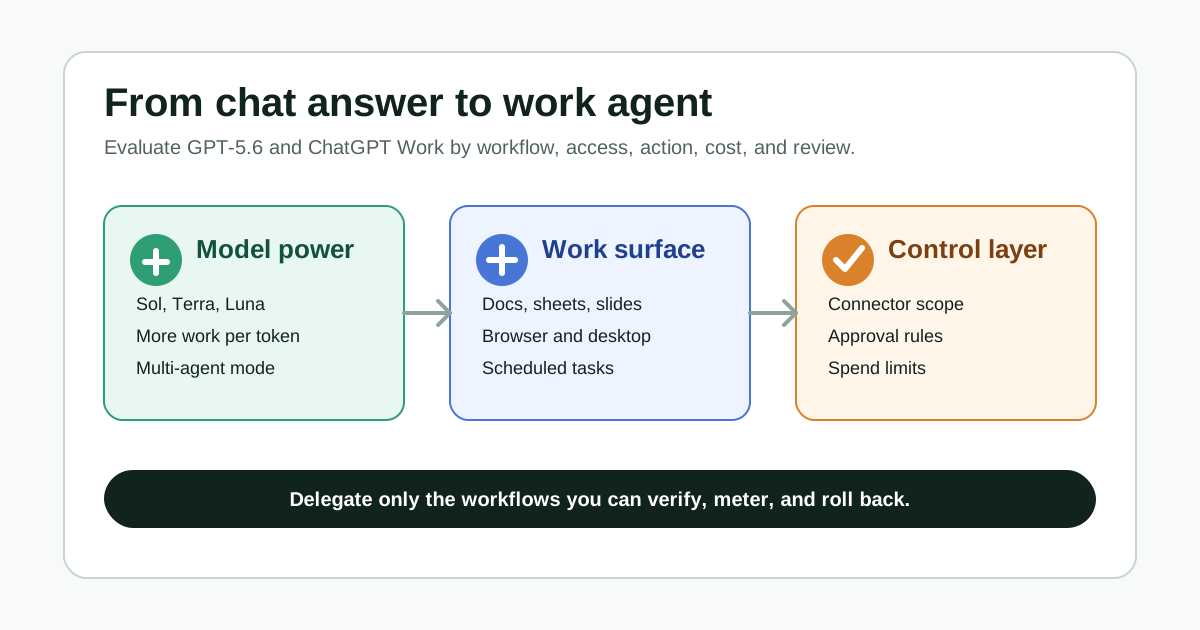
That is why the launch should not be judged by benchmarks alone. Judge it by whether the workflow can be verified, permissions can be controlled, usage can be metered, and mistakes can be rolled back.
Three signals matter together
The first signal is the model layer. OpenAI says GPT-5.6 includes Sol, Terra, and Luna: Sol as the flagship model, Terra as a balanced everyday-work option, and Luna as the fastest and most cost-efficient model. OpenAI also highlights stronger performance in coding, knowledge work, computer use, design, cybersecurity, and science, plus an ultra setting that coordinates multiple agents in parallel.
The second signal is the product layer. ChatGPT Work is described as an agent that can gather information across apps and workflows, create sheets, slides, docs, web apps, and other finished materials, and continue complex projects by breaking them into smaller steps.
The third signal is the office-suite layer. OpenAI also says GPT-5.6 will become the preferred model in Microsoft 365 Copilot across Word, Excel, PowerPoint, Chat, and Cowork. That makes the update relevant even for people who may encounter it inside work software rather than inside ChatGPT directly.
Taken together, the shift is clear: model capability, work surface, and enterprise distribution are moving at the same time.
Old chat assistant vs. new work agent
Use this table to frame the change.
| Dimension | Old chat assistant | New work agent |
|---|---|---|
| Input | You paste the question and context | The agent reads connected apps, files, websites, and workspace context |
| Output | An answer, draft, or code snippet | Docs, sheets, slides, web apps, reports, or task updates |
| Time | One turn or a short conversation | Longer projects, background work, and scheduled repeats |
| Risk | Wrong answer or missing context | Data misuse, wrong actions, file changes, or unexpected usage |
| Review | A human reads the answer | A human checks sources, diffs, action logs, and final artifacts |
| Management | Personal prompting habits | Organization-level connectors, permissions, logs, limits, and approvals |
That means teams should not treat ChatGPT Work or similar tools as a smarter chat box. A better mental model is a junior operator that can touch tools and materials. That can be much more useful, and it also needs much clearer boundaries.
Who feels it first
Developers will feel the work surface shift quickly. OpenAI says the Codex app is merging into the new ChatGPT desktop app, while Codex keeps its role for developers and technical professionals. The updated experience adds capabilities such as inline editing in diffs, pull request review in the side panel, faster computer use, and support for multiple repositories in a single project.
Product, operations, marketing, finance, and sales teams will be drawn to the cross-tool work. OpenAI’s examples include dashboards, launch checks, campaign briefs, account plans, customer research, and month-end finance workflows. The value is not just writing a paragraph; it is assembling scattered materials into something a team can act on.
Admins and security teams will run into governance first. ChatGPT Work becomes valuable because it can use connectors, browser context, desktop files, and scheduled tasks. Those same capabilities create the risk. Who can connect Slack? Who can read Drive or SharePoint? Which actions need approval? What logs are retained? Which groups have higher limits? Those questions matter more than the model name.
Six checks before adoption
First, pick a specific workflow. Do not start with a vague goal such as “make the team more efficient.” Good pilots are recurring, familiar, source-backed tasks where you know what a good output looks like: budget variance analysis, launch readiness checks, sales meeting prep, pull request review summaries, or customer feedback clustering.
Second, map the context sources. An agent can connect many tools, but it should not read everything by default. Separate public information, team-shared material, customer data, finance or legal files, personal files, and confidential material. More sensitivity means narrower scope, stronger approval, and clearer logging.
Third, define allowed actions. Reading, summarizing, drafting, creating files, editing files, sending messages, submitting pull requests, updating a CRM, and changing calendars are not the same risk. Early pilots can allow reading and drafting while keeping external or production actions behind approval.
Fourth, design the review path. The dangerous failure mode is not always an obviously bad answer. It is a polished output with a wrong source, number, or assumption. Each pilot should define what sources were used, what files changed, which numbers require manual review, and which conclusions are inference.
Fifth, watch usage and cost. OpenAI emphasizes GPT-5.6 efficiency, but also says ChatGPT Work usage varies by the amount of work required. Longer workflows, connectors, browsing, and multi-agent modes can change total usage. Do not evaluate a work agent with the cost intuition of a single chat turn.
For a model-level comparison of hosted routes across different agent workloads, see the Gemini 3.6 Flash vs. 3.5 Flash-Lite model selection guide.
Sixth, keep an exit path. Documents, sheets, code, and task records created by an agent should be easy to compare, revert, and audit. This matters most for local files, business systems, production code, and anything sent outside the team.
Treat the system card as a boundary document
The GPT-5.6 system card is worth reading carefully. OpenAI says the models are more capable than earlier models in cybersecurity and biology, but do not cross its Critical threshold in either category. It also separates legitimate defensive work, code review, vulnerability repair, education, and high-risk misuse.
For readers, that does not mean “the model is automatically safe.” It means two more practical things.
First, stronger capability requires sharper distinctions between users, tasks, and environments. A model that can help with security review should not receive the same permissions in every context. Second, the system card describes test boundaries; it does not replace your organization’s risk assessment. Your data, plugins, browser permissions, approvals, and logs decide the operational risk.
If a team wants to use ChatGPT Work in security, code, finance, legal, or customer-data workflows, the system card is a starting point, not the final control.
What is still uncertain
Benchmarks are not your workflow. OpenAI provides many evaluations, customer quotes, and performance claims, but your value depends on source quality, connectors, process design, and review discipline.
Efficiency is not the same as lower total cost. A stronger model may waste fewer steps, but if you delegate longer and more complex tasks, total usage can still rise.
More connectors mean more governance. Cross-tool work across Slack, email, cloud drives, CRMs, browsers, and desktop files is the source of value and the source of risk.
Personal and enterprise availability can differ. OpenAI Help says GPT-5.6 Sol in ChatGPT is rolling out to eligible paid plans, excluding Free, Go, and logged-out users. Managed-workspace settings can also affect access.
A conservative pilot route
If you want to try GPT-5.6 or ChatGPT Work now, do not start with the most sensitive or irreversible task.
A safer order looks like this:
| Stage | Good task | Review focus |
|---|---|---|
| Read-only summary | Meeting notes, competitor research, public web research | Source coverage and missing counterexamples |
| Draft generation | Briefs, reports, launch checklists, PR summaries | Structure, factual support, and traceability |
| File artifacts | Sheets, decks, internal pages, dashboards | Format, formulas, references, and diffs |
| Semi-automated execution | Scheduled updates, monitoring, prep work | Approval points, logs, notifications, rollback |
| High-permission action | Code submission, CRM updates, external messages | Least privilege, human approval, audit record |
This route is cautious, but it is practical. Work agents are best adopted by first letting them prepare, organize, compare, and create reviewable artifacts, then slowly moving closer to action.
FAQ
Has GPT-5.6 officially launched?
OpenAI announced the GPT-5.6 family on July 9, 2026, including Sol, Terra, and Luna, and says it is generally available after a limited preview.
How is ChatGPT Work different from normal chat?
Normal chat mainly answers questions or drafts content. ChatGPT Work is designed to run longer workflows across connected apps, files, browsers, and desktop context, producing sheets, docs, slides, web apps, and other finished materials.
Can free users use GPT-5.6 Sol in ChatGPT?
OpenAI Help says GPT-5.6 Sol in ChatGPT is rolling out to eligible paid plans. Free, Go, and logged-out users are not included; availability can vary by product, plan, and admin settings.
What should enterprise teams check first?
Start with connector scope, browser and network access, local file permissions, approvals for sensitive actions, audit logs, group limits, and spend controls.
Will this automatically reduce the cost of work?
No one should assume that. A more efficient model can still drive higher total usage if teams delegate longer tasks, use connectors, browse the web, or run multi-agent workflows.
Image and source notes
The cover is an original Wesbase adoption checklist diagram. It does not use OpenAI, ChatGPT, Microsoft, Copilot, partner, or media logos. The article relies on OpenAI’s GPT-5.6 launch page, ChatGPT Work launch page, GPT-5.6 system card, OpenAI Help model release notes, and OpenAI’s Microsoft 365 Copilot note. Official facts, my inferences, and adoption uncertainties are separated in the text.