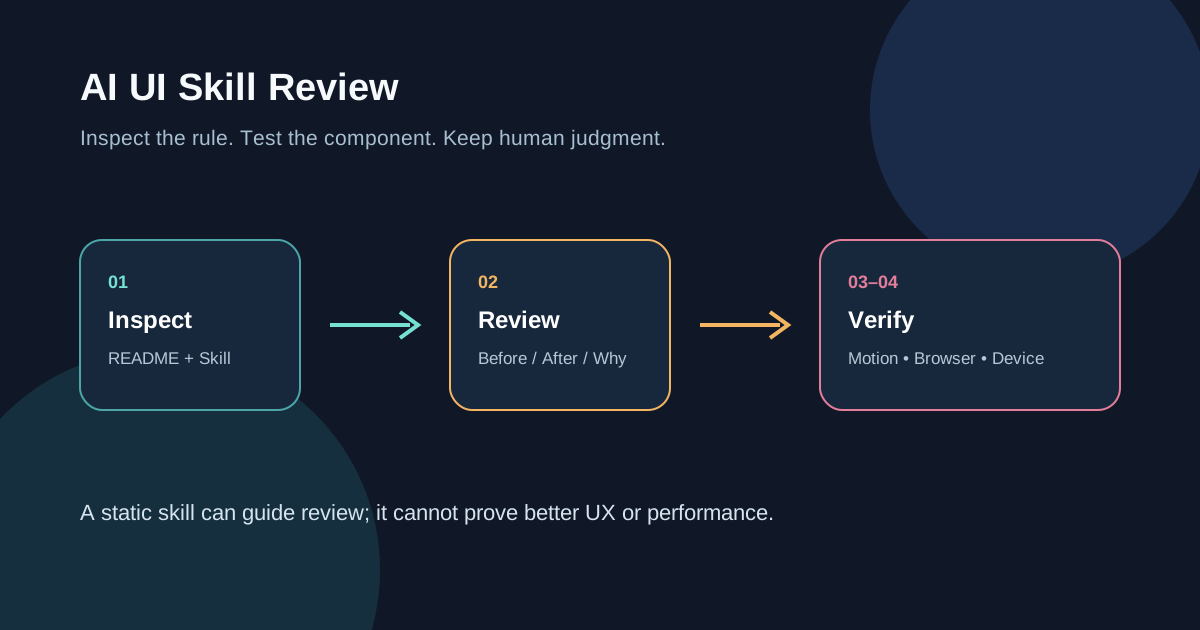
The question I wanted to test was not whether this repository can make a page instantly beautiful. It was narrower: can emilkowalski/skills turn the small details that AI-generated interfaces often miss into review questions a developer can actually verify?
The answer is yes, as a review aid. It is not a replacement for review.
What the repository actually is
emilkowalski/skills is a public GitHub repository that describes itself as a collection of design-engineering skills for designers and engineers building better interfaces. Its current README lists entries such as emil-design-eng, review-animations, improve-animations, find-animation-opportunities, animation-vocabulary, and apple-design.
It is not a component library or a renderer that turns a prompt into a finished interface. Its core material is agent-readable guidance, examples, and review formats. The README lists this installation entry point:
npx skills@latest add emilkowalski/skillsThe repository exposes an MIT license, but you should still read the current LICENSE file before using it. Whether the install path works depends on the skills support in your agent runner.
What this bounded test can and cannot show
I treated the repository as a reviewer and checked four areas: interaction feedback, motion decisions, performance hints, and accessibility boundaries. This is not a productivity study, a visual-quality score, a cross-browser benchmark, or a user study.
One useful constraint is the required Before / After / Why review table. Instead of saying that a button feels “less polished,” a review can point to transition: all, a missing press state, or a popover that scales from the wrong origin—and explain the proposed change.
That turns a vague aesthetic judgment into a code-level question. The developer can decide whether the suggestion fits the component instead of accepting it wholesale.
Put the guidance against one small component
A practical first test should use a button, dropdown, or toast—not an entire product:
- Give the agent the skill and ask it to review one component only, using a
Before / After / Whytable. - Check whether it names concrete properties, durations, triggers, and reasons instead of saying “more modern” or “smoother.”
- Operate the component in the browser: click repeatedly, open and close quickly, use the keyboard, and interrupt mouse or touch interactions.
- Turn on the operating system’s reduced-motion preference and check whether non-essential movement is reduced or replaced.
- If the advice concerns jank or responsiveness, inspect the target device with browser performance tools. A CSS review is not a performance test.
The skill file contains concrete review topics such as press feedback, trigger-aware popover origins, interruptible transitions, and avoiding vague all transitions. Those topics make review more specific, but they do not mean every project should use identical values.
Reduced motion is a required pass
Motion can communicate state, but it also has accessibility boundaries. MDN describes prefers-reduced-motion as the CSS media feature for detecting a user request to reduce non-essential motion, and notes that scaling and panning can be problematic for some users.
So “more polished animation” cannot be judged only in the default state. At minimum, check:
- whether non-essential movement is reduced or replaced when reduced motion is enabled;
- whether frequent keyboard actions feel delayed by animation;
- whether state remains understandable through color, status, or text;
- whether rapid interruption on a real device causes a jump or loss of spatial context.
Using transform and opacity may make some animations easier for browsers to optimize, but that is not a performance conclusion about your page. Layout, shadows, blur, scripts, and device conditions still matter, so profile when it matters.
Who should use it?
| Situation | Decision |
|---|---|
| You already have a UI component and want a more specific motion review | Worth trying |
| You want a shared Before / After / Why format for design review | Adapt it into a checklist |
| You expect one command to generate a complete, brand-consistent interface | Not the right tool |
| You cannot test in a browser, with accessibility settings, or on a target device | Do not treat the suggestions as conclusions |
It fits best after a component runs but before its details are considered finished. Treat it as a reviewer with strong preferences, then filter the suggestions through your design system, product context, and real devices.
What this test does not prove
This review confirms that the repository exists, its README exposes an installation path, its skill files contain a concrete review structure and UI rules, and those rules can be connected to reduced-motion and browser-performance checks.
It does not prove that an agent will follow the rules every time, that a page will look better, that users will prefer it, that a team will become more productive, or that a particular duration or easing will be faster on every device. GitHub stars and forks indicate attention, not effectiveness.
If you want to follow up, freeze one agent runner, one component, and one browser/device matrix. Record the original code, review output, changed interaction, and reduced-motion result. Without those boundaries, do not turn design experience into a benchmark.
FAQ
Is this an official Apple skill?
No. The repository includes an apple-design entry, but its public positioning is the author’s design-engineering skill collection. It should not be presented as Apple-endorsed.
Do I need React or Motion?
The research material includes CSS, JavaScript, and Motion examples, but this brief did not establish compatibility with every framework. Choose examples that fit your stack and treat compatibility as a test question.
Is reading the skill file enough?
No. The file can make review questions more concrete. The decision still requires browser interaction, keyboard checks, reduced-motion verification, and profiling when performance is at issue.
Is it worth following?
If you often ask an agent to modify UI, it is worth treating as an evolving review reference. Recheck the repository, installation path, and license before each use instead of treating the current rules as permanent standards.