Start by separating the permissions
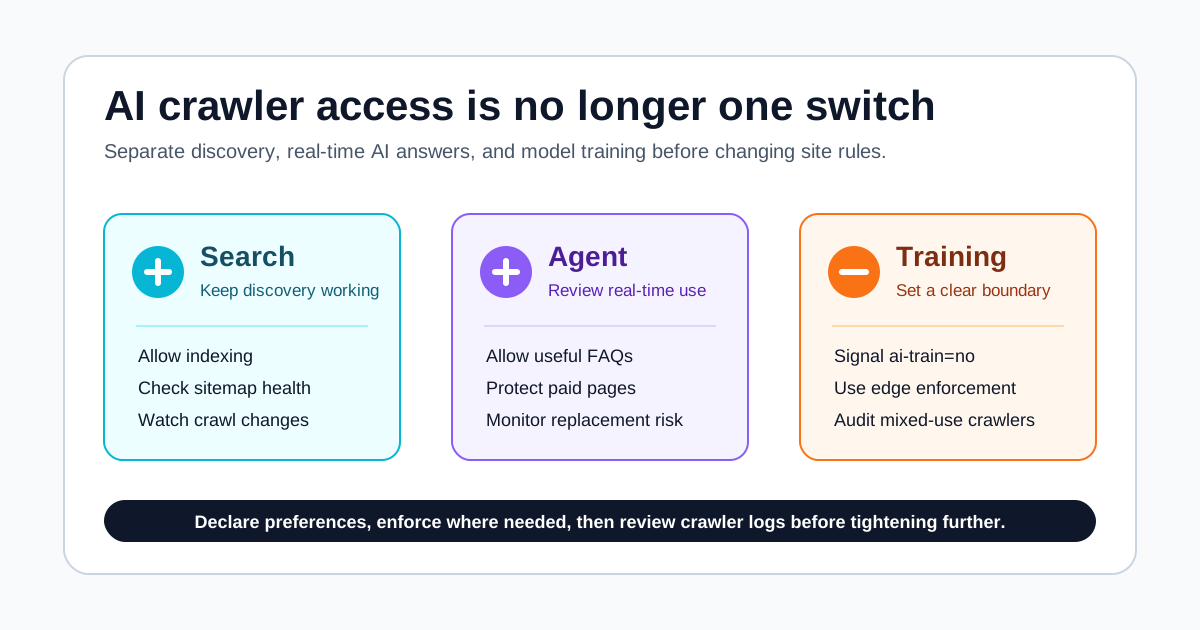
The important part of Cloudflare’s new AI crawler controls is not simply “block AI.” It is the split between Search, Agent, and Training.
For publishers, documentation sites, and product sites, the default answer should not be all-allow or all-block. The practical order is: keep ordinary search discovery, decide whether real-time AI answers are acceptable, and separately limit or refuse model training.
If you remember one rule, make it this: being discoverable in search is not the same as granting permission to train a model.
What changed
Cloudflare’s July 2026 announcement says its new AI traffic options manage crawlers by three use cases: Search, Agent, and Training. Cloudflare also says these options are available to all site owners on its network, including Free tier customers.
The announcement adds a date. Starting September 15, 2026, Cloudflare says the relevant defaults will block Training and Agent crawlers on pages that display ads, while Search will remain allowed by default. It also says multi-purpose crawlers that combine search and training will be handled according to all of their behaviors, which means the most restrictive applicable rule can matter.
That is why this deserves attention now. The old question was often “which user-agent should I add to robots.txt?” The new question is more precise: what type of use do you allow?
How to read the three categories
Use this table first.
| Category | Closest use | Common site posture |
|---|---|---|
| Search | Indexing, links, short snippets | Usually allow because it can return visitors |
| Agent | AI assistants reading pages to answer or complete tasks | Decide by page type and substitution risk |
| Training | Training or fine-tuning models | Many publishers restrict or refuse it |
Cloudflare’s Content Signals Policy uses a similar split. search means building a search index and returning results. ai-input means feeding content into AI models for retrieval-augmented generation, grounding, or real-time answers. ai-train means training or fine-tuning models.
This split helps site owners say something much more useful than “AI yes” or “AI no.” You can welcome search indexing, avoid granting training rights by default, and decide case by case whether AI answer systems should read specific pages.
A practical setup order
First, group pages by type. Public articles, help centers, product docs, pricing pages, logged-in pages, paid content, and ad-supported pages should not share one policy.
Second, preserve Search unless you are intentionally running a closed site. Search remains the main way public content is discovered. Cloudflare’s split matters because it can reduce the chance that anti-training settings accidentally become anti-discovery settings.
Third, state your Training position. If your pages are original articles, tutorials, product docs, or paid resources, you should at least express a preference such as ai-train=no in robots.txt or Content Signals. Cloudflare’s managed robots.txt docs show this kind of search-allowed, training-refused pattern.
Fourth, evaluate Agent access separately. AI assistants that read pages to answer questions may bring brand discovery and citations, but they may also replace visits. Pages that can work well are public FAQs, documentation, tutorials, and factual reference pages. Pages that need more caution include pricing, inventory, paid content, and high-risk advice.
Fifth, monitor the real crawlers. Cloudflare’s AI Crawl Control docs say it can show AI service access, set allow/block policies, track robots.txt compliance, and support pay-per-crawl options. In other words, robots.txt is a declaration; logs and edge rules are the audit.
robots.txt is not a firewall
The easiest mistake is treating robots.txt as technical enforcement.
Cloudflare’s docs say robots.txt compliance is voluntary. It expresses your preference, but it does not guarantee that every crawler will obey. If you need enforcement, you need AI Crawl Control, other edge rules, or application-level access controls.
The healthier stack looks like this:
| Tool | Role | Limitation |
|---|---|---|
robots.txt | Tells crawlers your preference | Voluntary compliance |
| Content Signals | Separates search, ai-input, and ai-train permissions | Crawlers still need to understand and respect it |
| AI Crawl Control | Monitors, allows, blocks, and tracks compliance | Requires ongoing review for false positives |
| Page policy | Separates public, paid, ad-supported, and product pages | The site owner must maintain it |
One dashboard switch is not an AI content governance strategy. Declare the preference, watch what actually happens, and adjust based on crawler behavior and traffic impact.
Mixed-use crawlers are the hard case
Cloudflare’s announcement includes a practical warning: multi-purpose crawlers that combine Search with Training will be governed according to all of their behaviors. TechCrunch framed this as Cloudflare pushing AI companies to separate search crawlers from agent and training crawlers.
For a normal site, the risk is straightforward. You may think you are refusing training, but a crawler that also supports search discovery could be affected. Or you may allow the crawler for search and accidentally allow a use you did not intend.
That does not mean you will automatically lose search traffic. It means the setting should not be blind. After changing policy, watch three things:
- Whether important pages are still crawled by search systems.
- Whether AI crawler requests decrease on training-sensitive, paid, or ad-supported pages.
- Whether visits from search, AI answers, direct traffic, and referrals show unusual changes.
Without those observations, no one should claim that a crawler setting will definitely grow traffic or fully protect content.
A conservative baseline for most sites
For a public blog, docs site, or small publisher, this is a reasonable starting point:
| Page type | Search | Agent / ai-input | Training / ai-train |
|---|---|---|---|
| Public articles and tutorials | Allow | Observe first, allow high-quality reference use if useful | Refuse or restrict by default |
| Help center / FAQ | Allow | Consider allowing | Refuse or restrict by default |
| Pricing / product pages | Allow | Be cautious because answers can go stale | Refuse |
| Paid or logged-in content | Do not publicly index | Refuse | Refuse |
| High-risk advice pages | Allow only with careful summaries | Be cautious or refuse | Refuse |
The point is not to be anti-AI. The point is to send different uses through different gates.
Uncertainty and boundaries
First, these settings are not SEO magic. They do not guarantee higher rankings, higher click-through rates, or more revenue. Search performance still depends on content quality, index health, page structure, speed, titles, internal links, and real demand.
Second, Cloudflare’s categories and controls do not mean every crawler will cooperate transparently. Content Signals are a clear expression layer, but the ecosystem is still adjusting.
Third, pay per crawl may matter first to large publishers. Smaller sites should treat it as a future option and focus now on page grouping, permission boundaries, and monitoring.
Fourth, if your site depends on ads, subscriptions, affiliate pages, or high-value product content, the September 15 default change is worth checking before crawler behavior or search visibility changes unexpectedly.
FAQ
What is the difference between Search, Agent, and Training crawlers?
Search is closest to traditional indexing and link results. Agent access uses pages in real time to answer questions or complete tasks. Training uses content to train or fine-tune models.
Should I just block AI bots?
Usually no. Most public sites still need search discovery. A safer baseline is to allow Search, review Agent access, restrict or refuse Training, and then monitor crawler behavior.
Can robots.txt actually block AI crawlers?
Not reliably. Cloudflare’s docs say robots.txt compliance is voluntary. It expresses preferences, but technical blocking requires edge enforcement such as AI Crawl Control or other rules.
What does ai-input mean in Content Signals?
It means content is used as input to AI models for real-time answers, retrieval-augmented generation, grounding, or similar use. It is separate from search indexing and model training.
Will these settings improve search traffic?
There is no guarantee. They are access-governance tools, not ranking tools. Search performance still depends on content quality, indexability, structure, speed, links, and demand.
Image and source notes
The cover is an original Wesbase checklist diagram. It does not use Cloudflare logos, dashboard screenshots, media images, or publisher logos. The article relies on Cloudflare’s July 2026 AI traffic options announcement, Cloudflare’s managed robots.txt docs, AI Crawl Control docs, the Content Signals Policy announcement, and TechCrunch coverage of the September 15 default change. Official facts, media interpretation, and my own inferences are separated in the text.