Bottom line
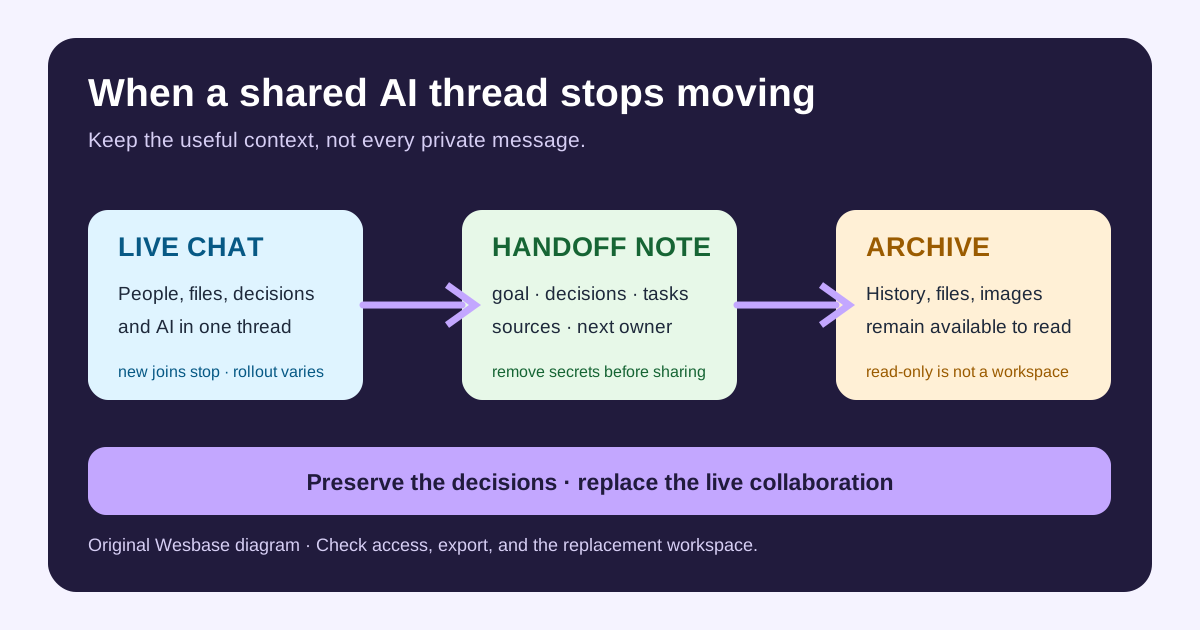
ChatGPT group chats are not being wiped on July 9. They are entering a retirement process: OpenAI has stopped new group chats, conversions from existing conversations, and invite-link joins. Existing chats remain usable during a transition and will eventually become read-only.
You do not need to panic-export every message. But if a group chat still runs a trip plan, family decision, study discussion, or small project, move the work forward now. A read-only archive is useful for reference; it is not a place where the team can keep collaborating.
What has been confirmed?
OpenAI’s Help Center gives a narrow product boundary. Since July 9, 2026, users can no longer create a group chat, turn an existing conversation into one, or join through an invite link. Existing chats remain active during rollout and then become read-only.
After a chat becomes read-only, participants can open it and review messages, files, and images already shared there, but cannot send new messages. OpenAI also says that private, individual ChatGPT conversations are not affected.
This is not the same as saying that all ChatGPT collaboration is ending. OpenAI describes group chats as a pilot for exploring collaboration, and says it is simplifying the product while applying what it learned to future collaborative experiences. The retirement notice does not confirm what a replacement will look like.
Who is most affected?
Families and friends
If the chat was used for travel, meals, moving, or household decisions, preserve the final choices, open questions, budget constraints, and useful links. A one-page shared note is often more reliable than treating an AI conversation as the project’s permanent home.
Study and research groups
The old files, images, and AI summaries can remain useful references. Still, write down which conclusions have original sources, who will verify them, and what the next discussion needs to answer. An AI summary can organize a group’s thinking; it does not replace evidence or ownership.
Small teams
Be more careful if the chat contains customer data, unreleased product plans, account details, or internal documents. Do not copy the entire thread into a new tool just because it also has AI features. Decide what needs to survive, then check permissions before sharing it again.
Should you export now?
Use the state of the work, not the level of anxiety, as your trigger.
| Situation | Recommendation | Why |
|---|---|---|
| Casual conversation or memories | No rush | OpenAI says history remains available |
| Active plan or task list | Create a handoff now | Read-only chats cannot move work forward |
| Important files, images, or sources | Make a separate copy if needed | It makes rebuilding context easier |
| Sensitive personal or business information | Minimize the migration | More raw history means more exposure |
OpenAI says no action is required to preserve history. If you want a separate copy, it points users to export through ChatGPT or the OpenAI Privacy Portal. That answers the data-retention question, but it does not create a new collaboration workflow for you.
A low-risk migration checklist
1. Write the goal first
Describe what the chat is meant to finish in one sentence: “Choose a three-day itinerary by August” or “Verify the sources for the course project.” Without a goal, migration becomes a transcript dump.
2. Keep five kinds of context
Preserve the goal, confirmed decisions, unfinished tasks, key sources, and the next owner. Leave jokes, repeated questions, dead links, and unrelated private material in the old archive.
3. Remove sensitive information
Look for names, phone numbers, addresses, identity documents, payment details, customer records, private links, and unreleased product information. You can often preserve a conclusion and its source without carrying the entire original conversation.
4. Choose a controlled replacement
For a family plan, use a shared document or group space people already trust. For a team, use a workspace with clear membership, permissions, version history, and revocation. A tool having an AI assistant does not make it suitable for every raw transcript.
5. Test access
After the move, check the document and files from a member or non-member view. A link that opens is not proof that the sharing design is correct.
What is not confirmed?
Some users speculate that OpenAI may replace group chats with a messaging-style collaboration feature. That may explain why people expect another social or collaborative surface, but it is not in the official retirement notice. Treating it as a roadmap would turn speculation into a promise.
The exact moment when each existing chat becomes read-only may also vary during rollout. A chat that still accepts messages today does not prove that every region will do so, and a failed invite does not mean the history has already vanished.
FAQ
Will ChatGPT group chats disappear immediately?
No. Existing chats remain usable during the transition and later become read-only. Messages, files, and images remain viewable, although the timing may vary during rollout.
Can I invite someone new after July 9?
No. New participants cannot join through a new or existing invite link. Existing participants can continue until the chat becomes read-only.
Are private ChatGPT conversations affected?
No. This change applies only to group chats.
Do I need to export every group chat now?
No. Do not export out of panic. If a chat contains active work, write a redacted handoff note first and request a separate export only when it is useful.
Uncertainty and boundaries
This article relies on OpenAI’s Help Center retirement notice and its original group-chat launch post. Those sources confirm the cutoff, product behavior, and history-retention boundary, but they do not confirm a replacement product, exact regional rollout timing, or the safety of any third-party migration tool.
The practical rule is simple: treat the group chat as a retiring collaboration entrance, and put filtered decisions, tasks, and sources into a workspace you can control. Do not make a complete private transcript your only project database.
Image and source notes
The cover is an original Wesbase SVG showing a path from a live group chat to a handoff note and a read-only archive. It uses no OpenAI logo, product screenshot, or third-party image. Product behavior comes from OpenAI’s Help Center retirement notice; the original launch post supplies the feature’s collaboration and privacy context. The recommendation that a redacted handoff is better for ongoing work than a raw transcript is an editorial inference.