Bottom line
Apple’s direction for Siri AI is clear, but it is not yet a universal agent that everyone can use today to control every app.
At WWDC26, Apple showed a Siri that understands personal context, reads the screen, answers web questions, and performs more actions across apps. Apple also put the feature on a developer-testing and later-beta timeline. The practical questions are less glamorous: Does your device support it? When will it reach your region and language? Does the app expose the action? Does a human still approve the final step?
What Apple actually announced
Apple introduced the next generation of Apple Intelligence and Siri AI on June 8, 2026. Its public description includes personal-context understanding across messages, email, and photos; onscreen awareness; web answers; a dedicated Siri app; and more systemwide app actions.
The difference from installing another chatbot is the system orchestration layer. Apple connects Siri with Spotlight, App Toolbox, App Intents, and Foundation Models. But knowing that an action exists does not mean every app exposes it, and exposing it does not mean the action will run without confirmation.
Four boundaries decide whether it is useful
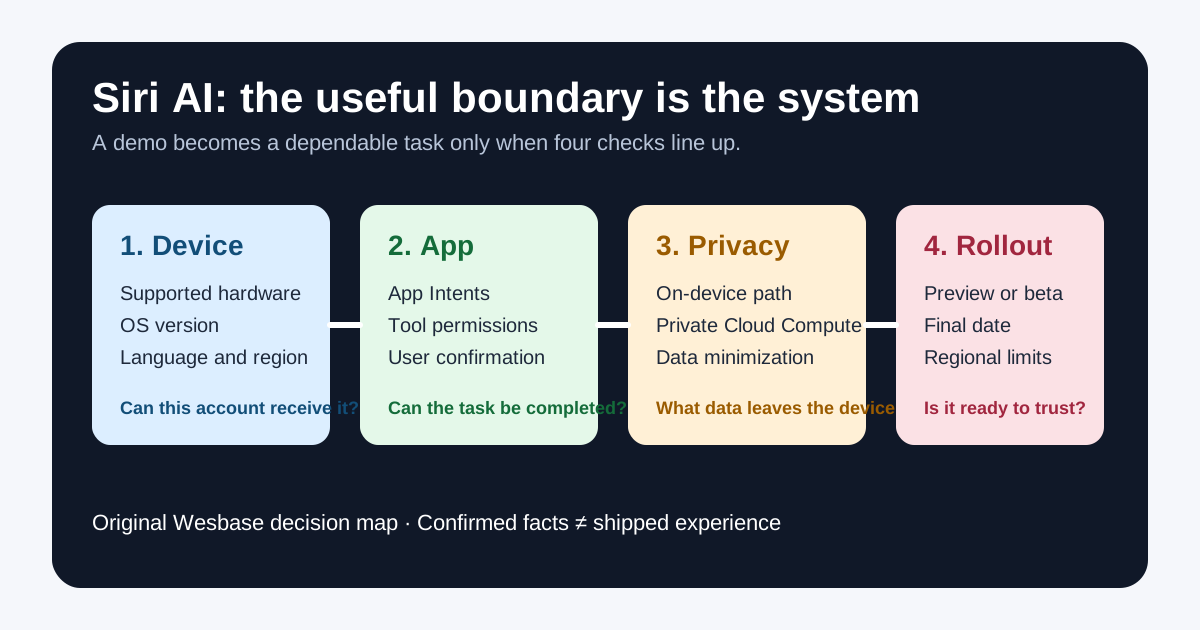
| Boundary | Confirmed public direction | What to check |
|---|---|---|
| Device | Apple publishes support across iPhone, iPad, Mac, Watch, and Vision Pro | Exact model, chip, OS, and pairing requirements |
| App | Apple is expanding App Intents, system actions, and Foundation Models | Whether the target app exposes the action and restricts sensitive operations |
| Privacy | Apple describes on-device models and Private Cloud Compute | What data leaves the device and whether the full context is necessary |
| Rollout | Developer testing comes first, with a user beta planned later in 2026 | Region, language, account, test access, and final date |
This turns “AI capability” into something testable. A feature belongs in a daily workflow only when all four checks line up.
For users: upgrade, test, or wait?
If you simply want to explore system answers, writing tools, or visual intelligence, wait for a stable release or Apple’s official user beta. Do not put a primary device on a risky developer preview merely because a keynote demo looked polished. The demo does not validate battery life, latency, language quality, or third-party compatibility.
If you are buying a device, do not treat “Siri AI” as a single hardware feature. Check Apple’s support list, then check your language, country, and most-used apps. The same iPhone model can face different availability and regulatory constraints in different regions; Apple’s Apple Intelligence topic page separately notes a DMA-related delay in the EU.
If you want Siri to handle appointments, payments, messages, or file changes, keep final confirmation as a hard boundary. Natural language makes an action easier to request; it does not solve recipient, amount, permission, or mistake risks.
For developers: make the app callable, not merely conversational
Apple’s developer documentation describes Foundation Models as a native Swift API. Developers can use the on-device Apple Foundation Model and connect compatible cloud models through a common protocol. The current documentation also highlights multimodal prompts, Dynamic Profiles, App Intents, and tools for evaluating and debugging agentic app experiences.
That creates three engineering questions. Which tasks can be triggered by natural language? Which inputs must be structured and validated? Which actions require a preview and explicit approval? Adding a chat box to an app does not make it safe for system-level invocation.
A sensible first set of actions is small, reversible, and inspectable: find an order, draft a reply, filter a project, or organize a group of photos. Deleting data, sending messages, making payments, submitting forms, and changing account settings need stronger permission isolation, previews, and confirmation.
Privacy architecture is not an accuracy guarantee
Apple emphasizes on-device models and Private Cloud Compute, saying that personal data handled there is not stored or accessible to Apple. That is an important architecture and privacy claim, but it should not be translated into “every request stays local” or “the model cannot be wrong.”
Use data minimization in practice. If an order number is enough, do not share the entire email. If one file is enough, do not grant the whole photo library. If a draft can be reviewed, do not let the system send it automatically. Privacy, permissions, and reliability are separate questions.
Confirmed facts, inference, and open questions
Confirmed: Apple has published Siri AI, Foundation Models, and related developer documentation, with developer testing before a planned user beta. Apple has also published a supported-device direction and described core system capabilities.
Reasonable inference: apps will increasingly compete on whether they can be called safely by a system assistant. That does not mean every app must integrate immediately, or that Apple has promised every third-party action will run automatically.
Still uncertain: the exact user-beta date, language and country coverage, quotas, latency, model quality, and how widely apps adopt App Intents. Without real-device testing and public results, do not turn a keynote demo into a universal availability claim.
FAQ
Is Siri AI fully released today?
Not yet. Apple says the new features are available for developer testing first and are planned as a user beta later in 2026.
Can Siri AI control every third-party app?
No. Apps need to expose capabilities through interfaces such as App Intents, and actions may still require permissions and confirmation.
Does Private Cloud Compute mean absolute privacy?
No. It is Apple’s privacy architecture and processing commitment, not proof that every request stays local or that every answer is correct.
Should developers integrate now?
They can start with low-risk, reversible, verifiable actions using Foundation Models and App Intents, while allowing for preview APIs, language coverage, regional rollout, and final UX changes.
Image and source notes
The cover is an original Wesbase system-AI boundary map with no Apple logo, keynote screenshot, or media image. Launch facts and developer capabilities come from Apple Newsroom and Apple Developer documentation. Claims about final experience, third-party compatibility, and regional rollout are explicitly marked as open questions or inferences.